 | Dev Portal
Event-Based Test Automation in Polaris for SCM Integrations
Overview
Prerequisites
- Only available for Azure Repos, Bitbucket Cloud (Premium), GitHub, GitHub Enterprise, or GitLab SaaS (Premium or Ultimate).
- An SCM integration that supports event-based testing automation (see Connect a Polaris project to a repository in your SCM or Connect Polaris to Multiple SCM Repositories).
- The access token used for integration must fit token requirements .
Setting inheritance
Event-based test automation settings set at the organization-level serve as defaults for all the applications, projects, and branches in your portfolio. However, test automation settings assigned to applications, projects, and branches take precedence:
- An application's settings override organization-level test automation settings.
- A project's settings override both application and organization-level test automation settings.
- A branch's settings override project, application, and organization-level test automation settings.
To check the active event-based test automation settings for an application or project, open the Analysis tab.
- For an application, go to Portfolio > select an application > Settings > Analysis.
- For a project, go to Portfolio > select an application > select a project > Settings > Analysis.
When Inherited appears at the top of the SCM Event-based Test Automation panel, the automation settings that apply to the application (example below) or project are inherited.

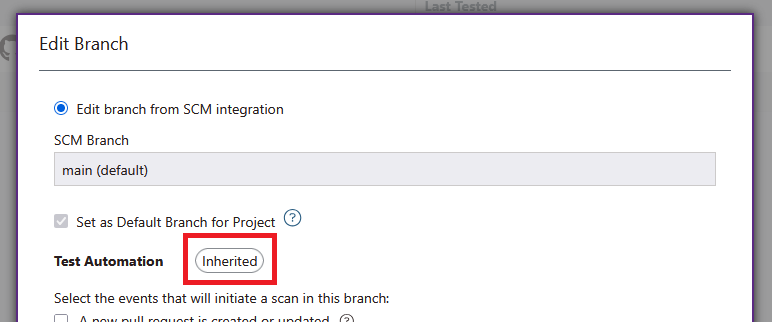
To check the active event-based test automation settings for a branch, go to Portfolio > select an application > select a project > Branches > select a branch. When Inherited appears near Test Automation, the automation settings that apply to the branch are inherited.
Update organization-level event-based test automation settings
To manage organization-level test automation settings, follow these steps:
Update application-level event-based test automation settings
To manage application-level test automation settings, follow these steps:
Update project-level event-based test automation settings
To manage project-level test automation settings, follow these steps:
Update branch-level event-based test automation settings
To manage branch-level test automation settings, follow these steps:
Reset event-based test automation settings
After you customize application, project, or branch-level test automation settings, you can select Reset to revert changes. When you reset an application's test automation settings, the application will inherit your organization-level test automation settings. When you reset a project's test automation settings, the project will inherit application (if set) or organization-level test automation settings. When you reset a branch's test automation settings, the branch will inherit project (if set), application (if set), or organization-level test automation settings.